Understanding Double NAT in a Home Network Setup
Double NAT is one of the most common networking situations in modern homes, especially when an ISP-provided router is combined with a personal Wi-Fi router.
In this article, we will use a real-world BSNL FTTH setup to understand:
- What Double NAT is
- Why it happens
- How traffic flows
- Problems it can cause
- Whether it is always bad
- How to optimize the setup
Real-World Home Network Topology
Below is the actual network layout used in this setup:
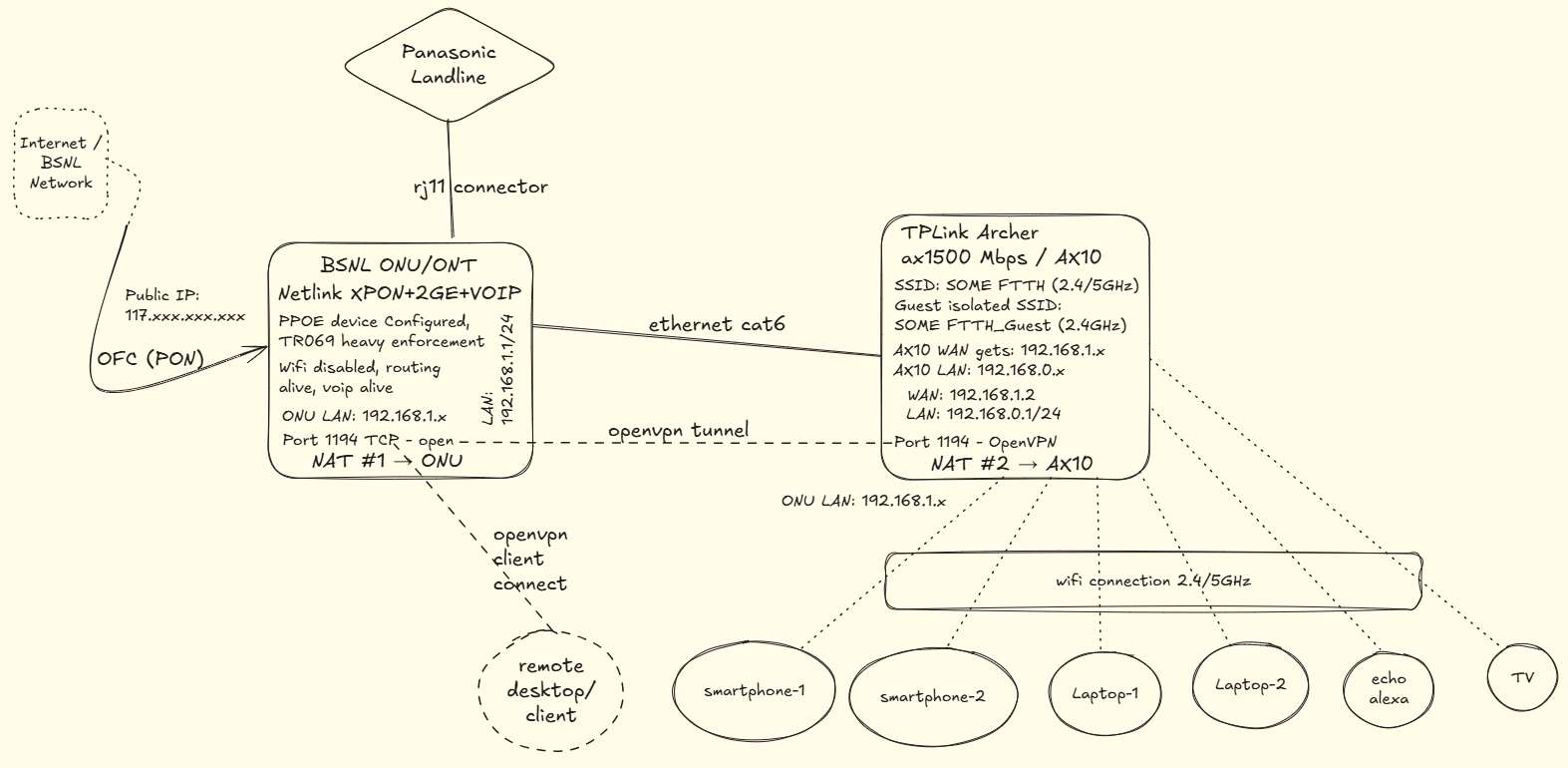
The setup contains:
- BSNL FTTH ONU/ONT
- TP-Link Archer AX10 router
- OpenVPN tunnel
- VoIP landline
- Multiple Wi-Fi devices
Understanding the Network Flow
The internet connection enters through:
BSNL FTTH Fiber → ONU/ONT → TP-Link AX10 → Home Devices
The BSNL ONU/ONT performs routing and NAT first.
Then the TP-Link AX10 router creates another private network and performs NAT again.
This creates:
NAT #1 → BSNL ONU
NAT #2 → TP-Link AX10
This is called Double NAT.
Device Breakdown
1. BSNL ONU/ONT
The ISP device is:
Netlink XPON + 2GE + VOIP
Responsibilities:
- Handles PPPoE authentication
- Receives the public IP
- Provides VoIP connectivity
- Routes internet traffic
- Performs first NAT layer
Important Configuration
ONU LAN: 192.168.1.1/24
Wi-Fi: Disabled
Port 1194 TCP: Open
The ONU assigns:
192.168.1.x
addresses to downstream devices.
2. TP-Link Archer AX10
The second router handles:
- Main Wi-Fi network
- Guest Wi-Fi isolation
- Device management
- Internal LAN routing
WAN Side
The AX10 receives:
192.168.1.2
from the ONU.
This already confirms another router exists upstream.
LAN Side
The AX10 creates a second network:
192.168.0.1/24
and assigns:
192.168.0.x
to all local devices.
This becomes the second NAT layer.
Why This Creates Double NAT
The traffic flow looks like this:
Laptop → AX10 NAT → ONU NAT → Internet
A packet gets translated twice:
1. AX10 converts local LAN traffic
2. ONU converts AX10 traffic again
Both routers maintain separate NAT tables.
OpenVPN Setup in This Network
An interesting part of this setup is the OpenVPN tunnel.
The diagram shows:
Remote Client
        ↓
Internet
        ↓
BSNL ONU
        ↓
TP-Link AX10
Port Forwarding
Port:
1194/TCP
is opened on the ONU and forwarded toward the AX10.
This allows external OpenVPN clients to connect into the home network.
Why VPNs Can Break Under Double NAT
VPN protocols often expect direct routing paths.
Double NAT can cause:
- Tunnel instability
- Connection timeouts
- Incorrect packet routing
- NAT traversal issues
Protocols commonly affected:
- IPSec
- L2TP
- PPTP
OpenVPN usually works better because it handles NAT traversal more gracefully.
Gaming Problems in Double NAT
Gaming consoles often detect this setup as:
- Moderate NAT
- Strict NAT
Possible issues include:
- Matchmaking delays
- Voice chat failures
- Multiplayer connection issues
- Higher latency
Is Double NAT Always Bad?
Not necessarily.
For most normal activities, Double NAT works perfectly fine:
- YouTube
- Netflix
- Browsing
- Video calls
Many users never notice it.
Problems usually appear only when applications require:
- Incoming connections
- Port forwarding
- Peer-to-peer communication
- VPN tunnels
- Self-hosted services
Advantages of This Setup
Despite Double NAT, this topology has some practical advantages.
Better Security Isolation
The AX10 creates another private boundary between devices and the ISP router.
Guest Wi-Fi Separation
Guest SSID isolation becomes easier.
Better Wi-Fi Performance
Personal routers like the AX10 usually provide:
- Better antennas
- Better roaming
- Better QoS
- Better device handling
ISP VoIP Compatibility
The ONU still handles:
- VoIP landline
- BSNL provisioning
- ISP authentication
without interfering with the custom Wi-Fi setup.
How to Detect Double NAT
You can identify Double NAT if:
WAN IP is Private
Your router WAN receives:
192.168.x.x
10.x.x.x
172.16.x.x - 172.31.x.x
instead of a public IP.
Traceroute Shows Multiple Private Hops
Example:
traceroute 8.8.8.8
Multiple private IP hops before the internet indicate nested NAT.
How to Fix Double NAT
Option 1: Enable Bridge Mode (Best Solution)
Convert the ONU into bridge mode.
Then:
- ONU stops routing
- AX10 receives the public IP directly
- Only one NAT layer remains
Result
Internet → ONU (Bridge) → AX10 → Devices
This is the cleanest setup.
Option 2: Use AX10 as Access Point
Disable routing on the AX10.
Then:
- ONU handles all routing
- AX10 only provides Wi-Fi
This removes the second NAT layer.
Option 3: Keep Double NAT
Sometimes keeping Double NAT is acceptable.
Especially when:
- ISP locks ONU settings
- VoIP depends on ISP firmware
- Bridge mode breaks services
- Everything already works fine
In many Indian FTTH setups, users intentionally keep this configuration.
Recommended Setup for Advanced Users
For:
- Homelabs
- Self-hosting
- Gaming servers
- VPN hosting
the preferred architecture is:
Internet
   │
Bridge Mode ONU
   │
Primary Router
   │
Switches / Mesh / Devices
This avoids unnecessary complexity.
Final Thoughts
This BSNL FTTH setup is a perfect real-world example of Double NAT in home networking.
The ISP ONU performs the first NAT layer, while the TP-Link AX10 creates another private LAN for better wireless control and device management.
Although Double NAT can create complications for gaming, VPNs, and port forwarding, it is not inherently wrong. For many households, it works reliably and offers flexibility without affecting everyday internet usage.
Understanding how packets travel through the network makes troubleshooting significantly easier and helps decide whether the setup should remain as-is or be optimized further.