Amazon Fire TV Stick HD
The Amazon Fire TV Stick HD is a compact streaming device that transforms a normal television into a smart streaming platform.
It connects to the TV using HDMI and streams online content through a Wi‑Fi internet connection.
Even though the device is very small physically, internally it works like a miniature computer designed specifically for streaming movies, TV shows, music, and applications from the internet.
The Fire TV Stick allows users to access platforms such as:
- Netflix
- Prime Video
- YouTube
- Disney+
- Plex
- Spotify
without requiring a traditional cable TV connection.
Basic Working Diagram
The following diagram demonstrates the basic connectivity and workflow of the Amazon Fire TV Stick HD.
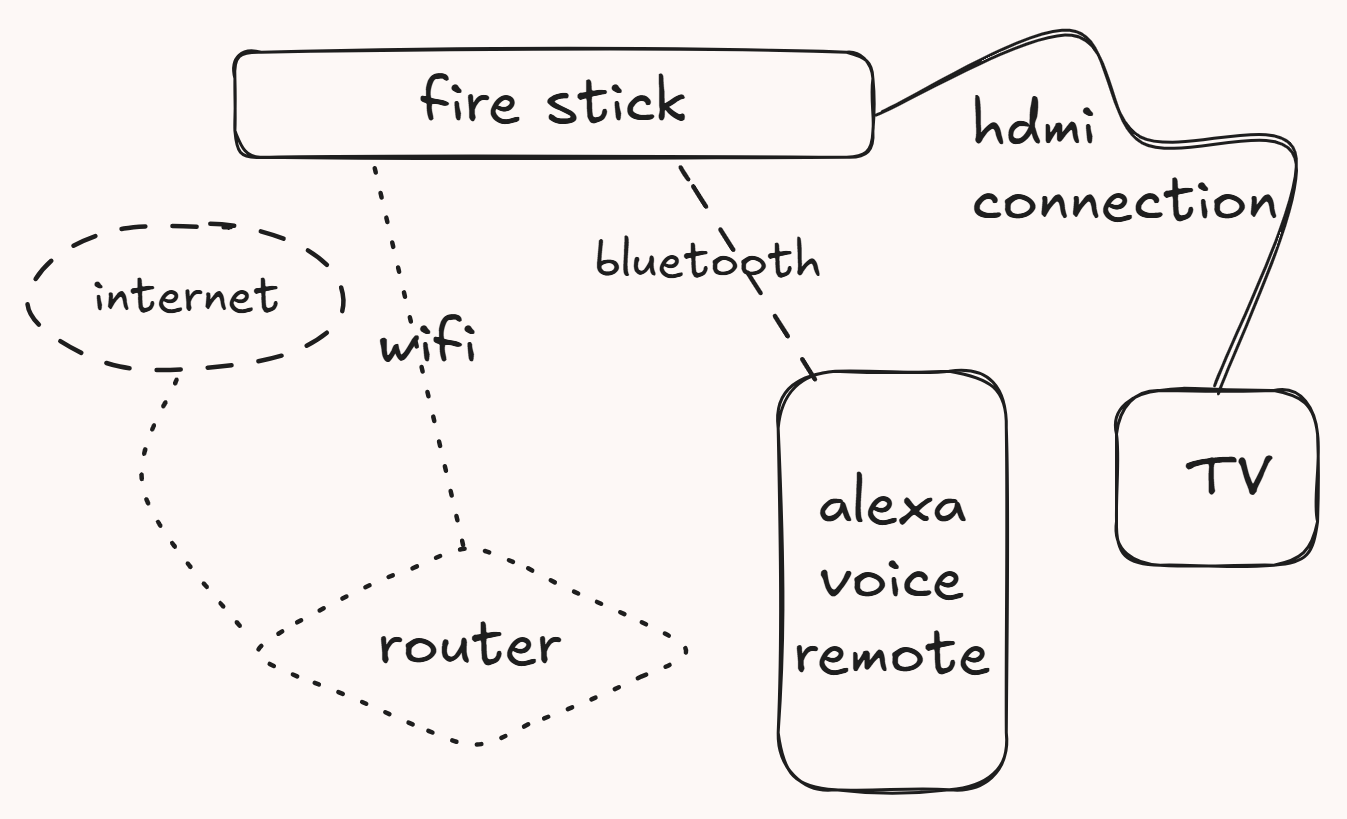
Basic Workflow
The Fire TV Stick HD operates using the following process:
1. Internet connectivity reaches the router.
The internet connection first enters the home router through fiber, broadband, DSL, or mobile internet.
The router acts like a traffic controller that distributes internet access to all connected devices.
2. The router provides wireless network access through Wi‑Fi.
The router converts the internet connection into wireless Wi‑Fi signals.
Devices such as phones, laptops, tablets, and the Fire TV Stick connect to this network without cables.
3. The Fire TV Stick connects to the router using Wi‑Fi.
The Fire TV Stick wirelessly connects to the home network to access internet services.
Most Fire TV Stick models support:
- 2.4 GHz Wi‑Fi
- 5 GHz Wi‑Fi
- Wi‑Fi 6 (newer models)
A faster and more stable Wi‑Fi connection helps improve streaming quality.
4. Streaming applications request video/audio data from cloud servers.
When the user opens an application like Netflix or YouTube and presses play, the application sends requests to streaming servers on the internet.
The servers continuously send compressed video and audio data to the Fire TV Stick during playback.
5. The Fire TV Stick decodes the media stream.
Movies and TV shows on the internet are compressed to reduce bandwidth usage.
The Fire TV Stick contains specialized hardware that converts the compressed stream back into visible video and audible sound in real time.
6. Audio and video are transmitted to the television through HDMI.
After processing the media stream, the Fire TV Stick sends digital video and audio signals to the television using HDMI.
The television then displays the video and plays the audio through speakers.
7. The Alexa Voice Remote communicates with the Fire TV Stick using Bluetooth.
The Alexa Voice Remote mainly uses Bluetooth wireless communication instead of traditional infrared signals.
This allows the remote to work even if the Fire TV Stick is hidden behind the television.
What Happens Internally When You Press Play?
When a user presses play on a movie or TV show, multiple internal operations happen within seconds.
1. The application sends a playback request.
The streaming app contacts cloud servers through the internet and requests the selected content.
2. User authentication takes place.
The streaming platform verifies:
- User login credentials
- Active subscription status
- Playback permissions
3. DRM security verification occurs.
Security systems verify that the content is licensed correctly and prevent unauthorized copying.
4. Video data begins downloading in small chunks.
Instead of downloading the entire movie at once, the Fire TV Stick receives small segments continuously during playback.
This process is called streaming.
5. Buffer memory temporarily stores upcoming data.
The Fire TV Stick stores a few seconds of upcoming video in memory to help prevent playback interruptions.
This process is known as buffering.
6. Hardware decoders decompress the media.
Dedicated hardware circuits decode compressed video and audio formats efficiently.
7. Audio and video synchronization occurs.
The system synchronizes:
- Lip movement
- Sound
- Video frames
to ensure smooth playback.
8. Final output is sent to the television.
The completed video and audio stream is transmitted through HDMI to the TV screen and speakers.
Main Components
Fire TV Stick
The Fire TV Stick is the primary streaming device.
It handles:
- Internet communication
- Application execution
- Video decoding
- Audio processing
- HDMI output
- User interaction
Internally, it functions like a compact entertainment computer.
Router
The router provides:
- Internet access
- Wireless connectivity
- Local network communication
The router allows the Fire TV Stick to communicate with online streaming servers.
Why Internet Speed Matters
Streaming quality depends heavily on internet speed.
Typical requirements include:
- 720p HD: ~3 Mbps
- 1080p Full HD: ~5–10 Mbps
- 4K Ultra HD: ~25 Mbps or higher
If internet speed becomes unstable, the Fire TV Stick may automatically reduce video quality temporarily to prevent buffering.
Alexa Voice Remote
The Alexa Voice Remote communicates mainly through Bluetooth.
Functions include:
- Voice search
- Navigation
- Playback control
- Volume adjustment
- Alexa integration
Voice commands are transmitted wirelessly to the Fire TV Stick.
Television
The TV acts as the display output device.
The Fire TV Stick sends:
- Digital video
- Digital audio
through HDMI.
The television then converts these digital signals into visible images and sound.
What HDMI Actually Does
HDMI stands for High‑Definition Multimedia Interface.
It is a digital connection standard used to transfer:
- High-quality video
- High-quality audio
through a single cable.
HDMI allows the Fire TV Stick to send both picture and sound to the television simultaneously.
Technical Architecture
The following diagram illustrates the internal technical architecture of the Fire TV Stick HD.

Internal Hardware Components
System on Chip (SoC)
The Fire TV Stick uses a MediaTek SoC that integrates multiple hardware modules into a single chip.
The SoC manages:
- Processing
- Graphics
- Video decoding
- Networking
- Memory control
Combining multiple components into one chip helps:
- Reduce power consumption
- Reduce physical size
- Improve efficiency
CPU
The CPU executes:
- Applications
- System services
- User interface logic
- Networking tasks
The CPU acts like the “brain” of the Fire TV Stick.
The Fire TV Stick HD includes:
- ARM Cortex‑A55 cores
GPU
The GPU handles:
- User interface rendering
- Graphics acceleration
- Menu animations
- Frame composition
The GPU helps create smooth animations and responsive menus.
Video Decoder (VPU)
Dedicated hardware decoders process compressed video formats such as:
- AV1
- H.264
- H.265 / HEVC
- VP9
Hardware decoding improves:
- Performance
- Power efficiency
- Smooth playback
Why Hardware Decoding Matters
Modern video files are heavily compressed to reduce internet bandwidth usage.
Decoding video completely using software would:
- Increase processor load
- Generate more heat
- Reduce efficiency
Dedicated video decoding hardware solves this problem using specialized circuits designed specifically for media playback.
Benefits include:
- Smoother playback
- Lower power usage
- Reduced overheating
- Better streaming stability
Audio DSP
The Audio DSP processes audio formats including:
- Dolby Digital
- Dolby Atmos
- DTS
- AAC
- FLAC
- PCM
It ensures audio playback remains synchronized and clear.
RAM
RAM stores temporary working data for:
- Applications
- System processes
- Media buffering
RAM acts like short‑term memory for the device.
Storage
Internal storage contains:
- Operating system
- Installed applications
- Cache files
- Configuration data
Unlike RAM, storage retains information even after power is turned off.
Software Architecture
The Fire TV Stick HD operates using multiple software layers.
Bootloader
The bootloader initializes hardware and securely starts the operating system.
It is the first software that runs when the device powers on.
Linux Kernel
The Linux kernel manages:
- Device drivers
- Memory management
- Networking
- Security
- Hardware communication
It acts as a bridge between hardware and software.
Vega OS Core
Vega OS provides:
- Core operating system services
- System libraries
- Hardware abstraction
It forms the primary operating environment for applications.
Application Framework
The framework manages:
- Media playback
- User interface rendering
- Alexa integration
- Application runtime
This layer helps applications function consistently across the system.
Applications
Applications include:
- Netflix
- Prime Video
- YouTube
- Disney+
- Plex
- Kodi
- IPTV applications
These apps stream content directly from internet servers.
Streaming Data Flow
The Fire TV Stick streams content using the following pipeline:
Internet
   ↓
Router
   ↓
Fire TV Stick
   ↓
Encrypted Media Stream
   ↓
DRM Verification
   ↓
Hardware Video Decoder
   ↓
Audio Decoder
   ↓
HDMI Output
   ↓
Television
What Is Buffering?
Buffering is the process of temporarily storing a few seconds of video data in memory before playback.
This helps the Fire TV Stick continue playing smoothly even if internet speed fluctuates briefly.
Without buffering:
- Videos may pause frequently
- Playback could become unstable
Weak Wi‑Fi signals and slow internet speeds commonly cause buffering issues.
DRM (Digital Rights Management)
The Fire TV Stick supports secure media playback technologies including:
- Widevine
- PlayReady
- FairPlay
DRM ensures:
- Secure content streaming
- HD/4K playback authorization
- Anti-piracy protection
Before playback begins, DRM systems verify that the user has proper access rights to the content.
Supported Video Technologies
Video Codecs
The Fire TV Stick supports:
- AV1
- H.264
- H.265 / HEVC
- VP9
- MPEG-2
- MPEG-4
These codecs compress video efficiently while maintaining visual quality.
HDR Technologies
Supported HDR standards include:
- HDR10
- HDR10+
- HLG
These technologies improve:
- Brightness
- Contrast
- Color accuracy
HDR helps produce more realistic and vibrant visuals.
Audio Technologies
Supported audio formats include:
- Dolby Digital
- Dolby Atmos
- DTS
- DTS-HD
- AAC
- FLAC
- PCM
These audio technologies improve sound clarity and immersion.
Connectivity Features
Wireless
Supported wireless technologies:
- Wi‑Fi 6
- Bluetooth 5.3
- Bluetooth Low Energy (BLE)
Wired
The device supports:
- HDMI 2.1 output
- USB‑C power/service connection
- Optional Ethernet adapter support
Why Fire TV Stick Gets Hot
The Fire TV Stick continuously performs intensive operations such as:
- Video decoding
- Networking
- Audio processing
- Application execution
Because the device is extremely compact, heat dissipation space is limited.
Mild warmth during operation is normal.
Excessive heat may occur due to:
- Poor ventilation
- Continuous high-resolution playback
- High room temperature
- Faulty power adapters
Smart TV vs Fire TV Stick
| Smart TV | Fire TV Stick |
|---|---|
| Built into TV | External streaming device |
| Hardware fixed permanently | Easy to upgrade |
| Can become slower over time | Easier replacement |
| Limited updates | Frequent software updates |
| Expensive to replace | Lower-cost upgrade option |
Can Fire TV Stick Work Without Wi‑Fi?
Yes, but with limitations.
Without internet:
- Online streaming apps cannot function
- Cloud-based media cannot load
However, users may still:
- Play local media
- Use offline applications
- Connect using Ethernet adapters
- Use mobile hotspot connections
Why Fire TV Stick Needs Internet
Streaming platforms store movies and TV shows on remote cloud servers rather than locally on the device.
The Fire TV Stick continuously communicates with these servers to:
- Download video data
- Verify licenses
- Load recommendations
- Synchronize playback
Without internet access, online streaming becomes unavailable.
Security and Privacy
The Fire TV Stick includes several security technologies such as:
- Encrypted communication
- Account authentication
- Secure application installation
- DRM protection
- System updates
Voice commands processed through Alexa may also communicate with Amazon cloud servers for speech recognition.
Troubleshooting Common Problems
Buffering Issues
Possible causes:
- Slow internet
- Weak Wi‑Fi signal
- Router congestion
Solutions:
- Restart router
- Move closer to Wi‑Fi
- Reduce streaming quality temporarily
Remote Not Working
Possible causes:
- Dead batteries
- Bluetooth pairing problems
Solutions:
- Replace batteries
- Re-pair remote
- Restart device
Black Screen
Possible causes:
- HDMI connection issue
- Unsupported resolution
- Power problem
Solutions:
- Reconnect HDMI
- Restart television
- Use original power adapter
Fire TV Stick Stuck on Logo
Possible causes:
- Corrupted update
- Power interruption
- System crash
Solutions:
- Restart device
- Use proper power supply
- Factory reset if necessary
Advantages of Fire TV Stick HD
Portable Design
The Fire TV Stick is compact and portable, making it ideal for:
- Travel
- Hotel usage
- Secondary televisions
Smart TV Features
It provides:
- Streaming applications
- Voice assistant support
- App ecosystem
- Screen mirroring
Hardware Video Decoding
Dedicated decoding hardware enables:
- Smooth playback
- Reduced CPU usage
- Efficient streaming
Conclusion
The Amazon Fire TV Stick HD is a lightweight streaming computer designed for internet-based media playback.
Internally, it combines:
- Hardware acceleration
- Wireless networking
- Secure streaming technologies
- Multimedia processing
- Operating system services
The device uses:
- Wi‑Fi for internet communication
- Bluetooth for remote interaction
- HDMI for media output
- Dedicated hardware decoders for video playback
This architecture allows the Fire TV Stick HD to stream modern high-definition media smoothly while maintaining low power consumption and compact size.